Do you know what to audit on domain controllers?
Loading last updated info...
To detect and mitigate a cyber attack, the right set of events need to be collected from your domain controllers. The audit policy is a compromise between collecting too many and too few events. Logs are useful for detecting security events, but if there is too much noise, you'll miss the important information.
To enable advanced auditing on your domain controllers, use group policy. The settings are in Computer Configuration | Windows Settings | Security Settings | Advanced Audit Policy Configuration | Audit Policies.
adsecurity.org has great recommendations for what you should be auditing on your domain controllers (as well as a heap of other useful information!). Here is their list:
- Account Logon
- Audit Credential Validation: Success & Failure
- Audit Kerberos Authentication Service: Success & Failure
- Audit Kerberos Service Ticket Operations: Success & Failure
- Account Management
- Audit Computer Account Management: Success & Failure
- Audit Other Account Management Events: Success & Failure
- Audit Security Group Management: Success & Failure
- Audit User Account Management: Success & Failure
- Detailed Tracking
- Audit DPAPI Activity: Success & Failure
- Audit Process Creation: Success & Failure
- DS Access
- Audit Directory Service Access: Success & Failure
- Audit Directory Service Changes: Success & Failure
- Logon and Logoff
- Audit Account Lockout: Success
- Audit Logoff: Success
- Audit Logon: Success & Failure
- Audit Special Logon: Success & Failure
- System
- Audit IPsec Driver: Success & Failure
- Audit Security State Change: Success & Failure
- Audit Security System Extension: Success & Failure
- Audit System Integrity : Success & Failure
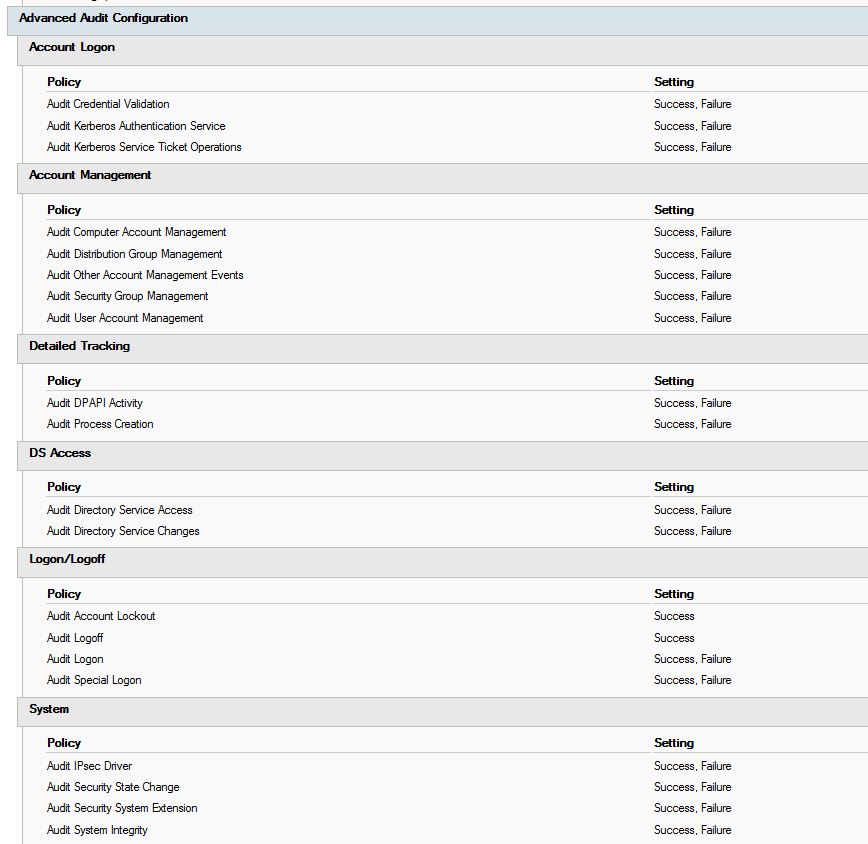
✅ Figure: Recommended auditing enabled
See the list in context, and more information here: https://adsecurity.org/?p=3377