Do you know how to enter a receipt through Xero Me?
Loading last updated info...
Xero Me is a comprehensive tool that combines expense claims with Xero payslips and leave entitlements.
To avoid confusion, add as much relevant details as possible into the subject field, e.g. "Scrum Course 50% - Approved by: Penny".
An example expense is outlined below:
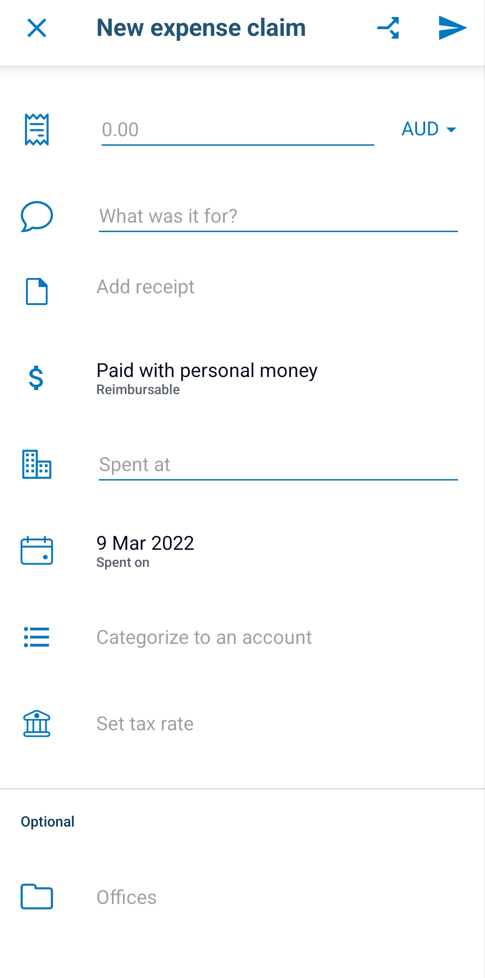
Figure: New Expense claim required fields
To enter the expense claim in Xero Me, follow the steps below:
- Open Xero Me
- Tap Expenses and then tap "New claim"
- Take a photo of the tax invoice ensuring the photo is clear and captures all invoice details
- For Xero Me to extract details automatically, tap "Analyze"
- Attachments and details such as invoice amounts, company and date should populate automatically
- Fill in the subject field with relevant information (e.g. "Scrum Course [50% Approved by: Penny]")
- Select "Paid with personal money - Reimbursable"
- Select the most appropriate account (e.g. "Office Amenities" account is used for lunch or office groceries)
- Tax rate will populate automatically based on default account settings
- Select the office based on your location
- Optional details such as motor vehicle, assign to customer and assign labels are not required
- Review your expense claim to ensure all details are correct
- Submit the expense claim
Xero Me has a smart scan function which will read the amount, supplier name and invoice date directly from the invoice. The subject field ("What was it for?"), reimbursable field, categorize field and office field will need to be added in manually.
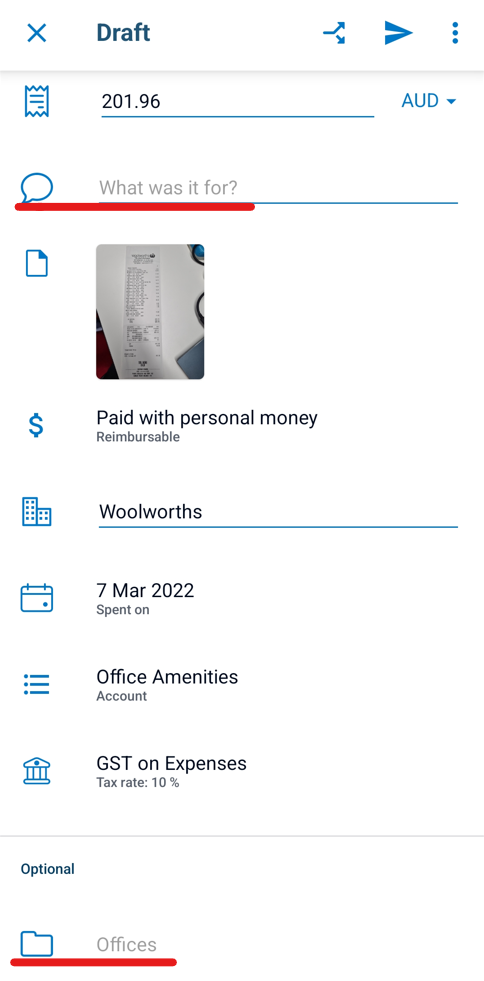
❌ Figure: Bad example - The Subject field and Office field are blank

✅ Figure: Good example - All the fields are filled in and the subject field is relevant and short
If the expense is not reimbursable, i.e. has been paid on the company's credit card, tap on the "Paid with" field and change it to "Paid with company money" and change the bank account/credit card field to either Amex or Citibank.

Figure: Non-reimbursable expense
A detailed step-by-step Xero process on how to enter expense claims in Xero Me from from your phone or desktop can be found here.