This rule has been archived
This applies to old versions of Visual Studio as the test frameworks now provide their own test runner implementations for Visual Studio
Do you know how to run nUnit tests from within Visual Studio?
Loading last updated info...
Option 1: External tool (not recommended)
Using NUnit with Visual Studio: To make it easy to use, you need to add it as an external tool in Visual Studio.
In Visual Studio:
- Go to Tools > External Tools
- Click "Add" button
- Type in:
- Title: NUnit GUI
- Command: Location of nUnit.exe file
- Argument: /run (so that the tests run automatically when started)
- Initial Directory: $(Target directory)
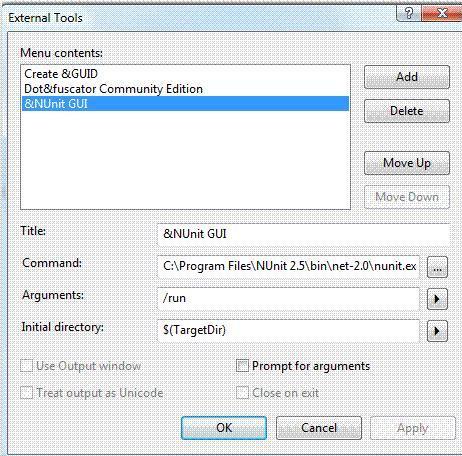
❌ Figure: Bad Example - NUnit In Visual Studio
Option 2: Test Driven .net
TestDriven.net has better NUnit integration – from both code and Solution Explorer windows.
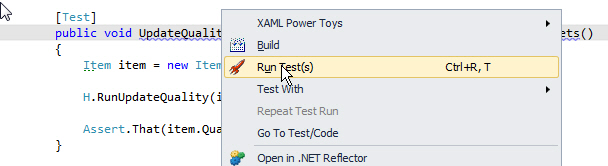
Figure: Better way - Use TestDriven.Net - it has a 'Run Test(s)' command for a single test (above) or...
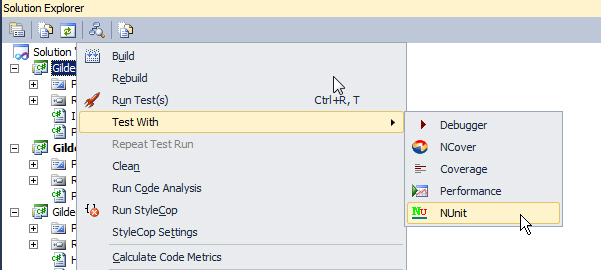
Figure: ...you can right-click on a project and select 'Test With > NUnit' to bring up the GUI. It is certainly more convenient
To run unit testing: Tools > NUnit GUI to launch NUnit and run the tests.
Option 3: Other Tools
Other Visual Studio tools including Resharper and Coderush have their own integration with NUnit. If you’re already using one of these, installing TestDriven.net is unnecessary.