Rules to Better Markdown - 3 Rules
Markdown powers a large part of modern documentation, but small mistakes can quickly reduce clarity and consistency. These rules help you write clean, structured Markdown that is easy to read, easy to maintain, and reliable across platforms.
You want users to easily edit content, so you put an "edit" button on the page. From there, you can choose between the power of HTML or the limitations of Markdown.
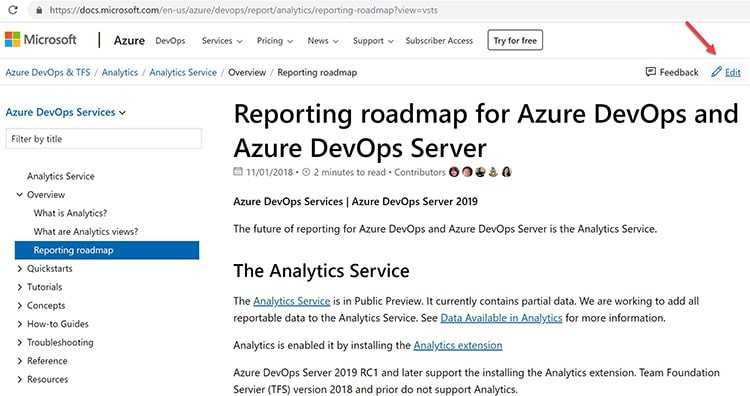
Figure: "Edit" button to encourage users updating the content HTML is frightening for unfamiliar users, as one wrong tag or an inline styling can break the whole page view.
Markdown is simpler and encourages more editing without breaking the page.
The original spec for Markdown does not specify the syntax unambiguously – so there are different flavours of the spec available. Some popular ones include:
- Commonmark Spec
- GitHub Simple
- GitHub the Spec
- markdown-it (really flexible, pluggable library based on CommonMark)
The Markdown Cheatsheet is a great page to reference when learning Markdown.
Depending on the Markdown parser you choose, there are many plugins that allow you to extend it. SugarLearning and SSW.People provide more extensive cheatsheets which include a number of custom templates and plugins:
- SugarLearning cheatsheet (using Markdown-it parser)
- SSW.People cheatsheet (using CommonMark parser)
- SSW.Rules cheatsheet (using CommonMark parser)

Figure: Markdown Icon Tip: To make it extra easy for editors, use TinaCMS into your Markdown-based project to provide a WYSIWYG (what you see is what you get) editor experience.
Videos
Video: "Markdown - How to use it, What is it and Why Use it | Ask a Dev" (9 min)
Using GitHub and Markdown to store you content by Thiago Passos (4 min)
Don't store content as HTML - It's a trap
Rich HTML Editors make your life easier at the beginning and produce content that looks nice and clean, but behind the scenes, it generates HTML which can get out of control quickly especially if you need to edit the source code (E.g. include a special style). It becomes incredibly difficult to maintain over time.
Some examples of rich HTML editors that you can embed in your web applications:
Note: None of these are recommended because of the HTML that is generated.
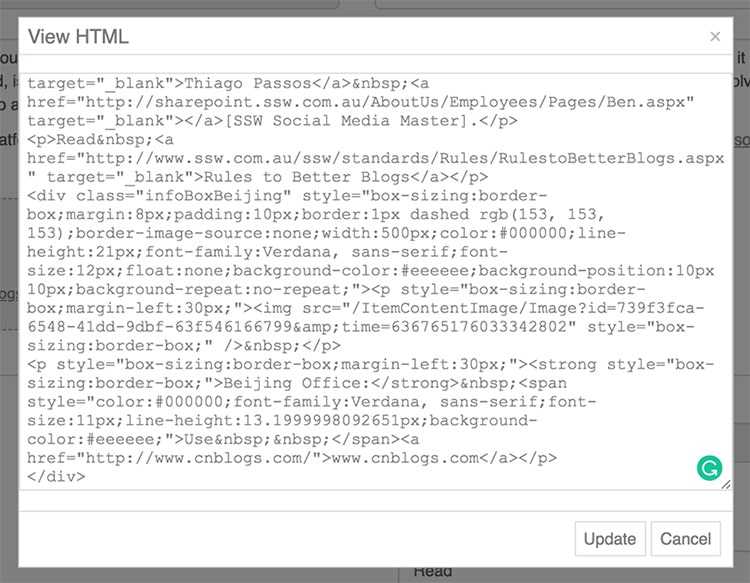
Figure: Bad example - HTML generated by a rich editor gets harder to maintain over time Store content in Markdown
Content is typically either stored in files (eg. git) or a database. When stored in files, it is common to use a static site generator with a JAMStack approach (e.g. Gatsby, Vuepress, Hexo, etc). That is, you commit content into git and a CI/CD pipeline is executed. The resulting files (HTML and CSS) are then served from storage which is cheaper and typically more scalable than compute resources in the cloud. In this case, the workflow will be a development style workflow (commit to git, push, etc) and the editor will be the one you choose. (e.g. GitHub editor or VS Code) These editors are not likely to produce a rich editing experience, nor do they need to.
For a non-technical audience, it helps to store your content as Markdown in a database and convert to HTML on the fly. This removes the code repository/CI/CD pipelines and can feel more natural for a non-developer audience. In this case, you will provide an editor and it is recommended that this be a rich editor.
Markdown rich editors
The Markdown rich editors are not as good as the HTML ones, but at least the content they produce is maintainable over time.
Some example of rich Markdown editors are:
- ProseMirror
- Editor.Md
Note: It is the #1 editor on Top 7: Best Markdown editors Javascript and jQuery plugins - ToastUI Editor (recommended) Note: ToastUI provides more customization options (menu and language) than Editor.md
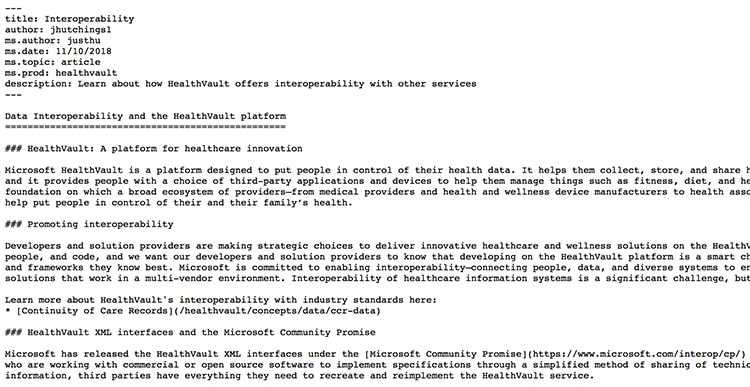
Figure: Good example - Markdown looks clean Markdown can have rich content too
Markdown is simple and limited, but you can make it richer.
One way is to use inline HTML, this allows you to use HTML tags that you are familiar with (only if you need to) and embed things like YouTube videos or JavaScript.
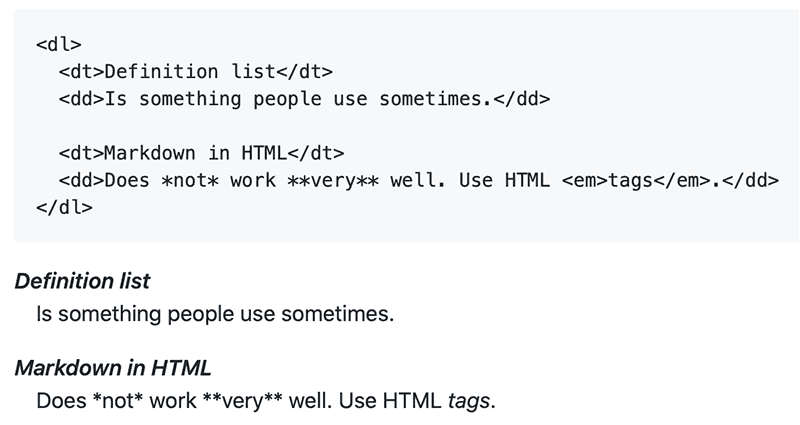
Figure: OK Example – you can use raw HTML in your Markdown, and mostly it will work pretty well. But you can’t use Markdown’s syntactic sugar in the HTML The other way is to use templates or containers:
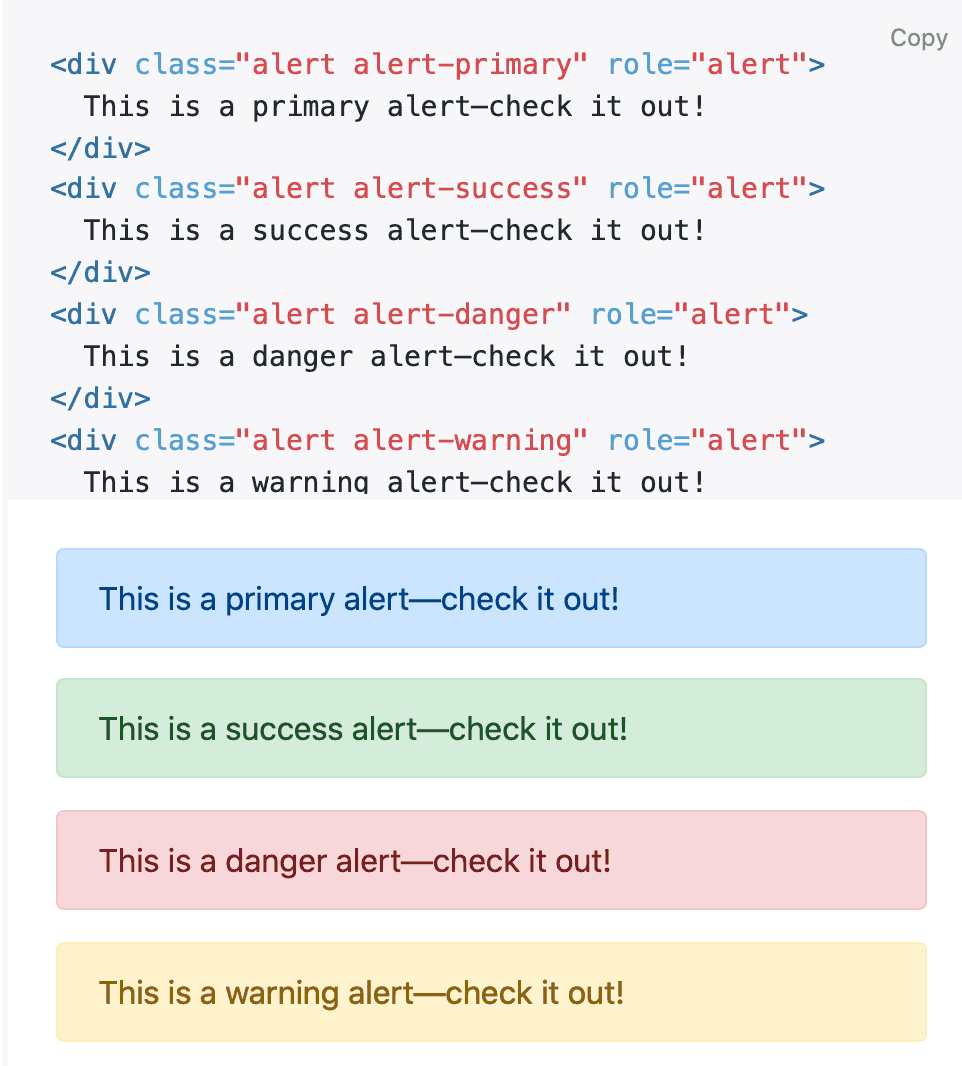
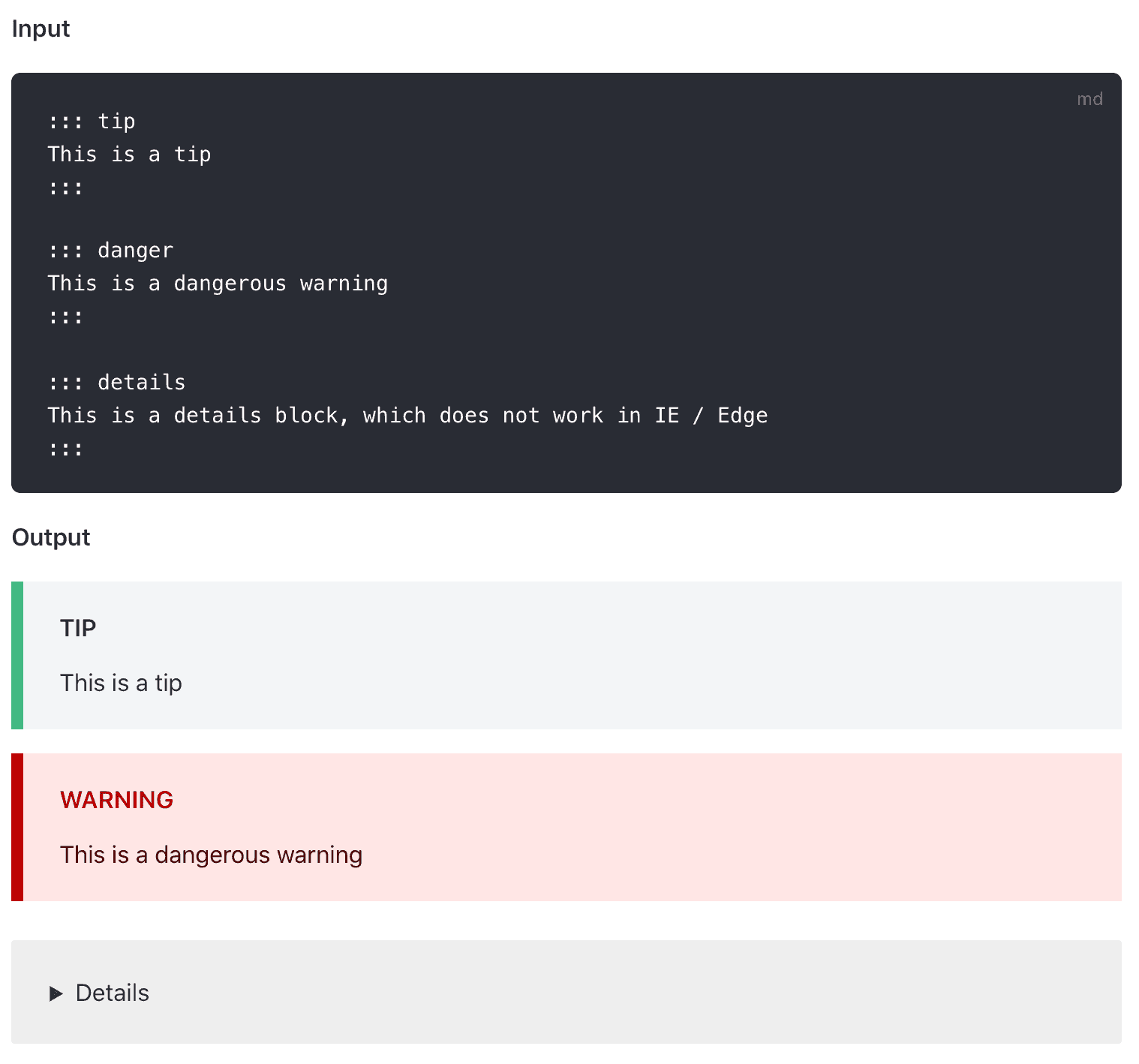
Figure: Bad example – The danger of using HTML in your Markdown files is that you add too much formatting e.g. use Bootstrap classes that create a tight coupling between the content and the presentation A better way is to use a plugin (if your Markdown engine supports it).
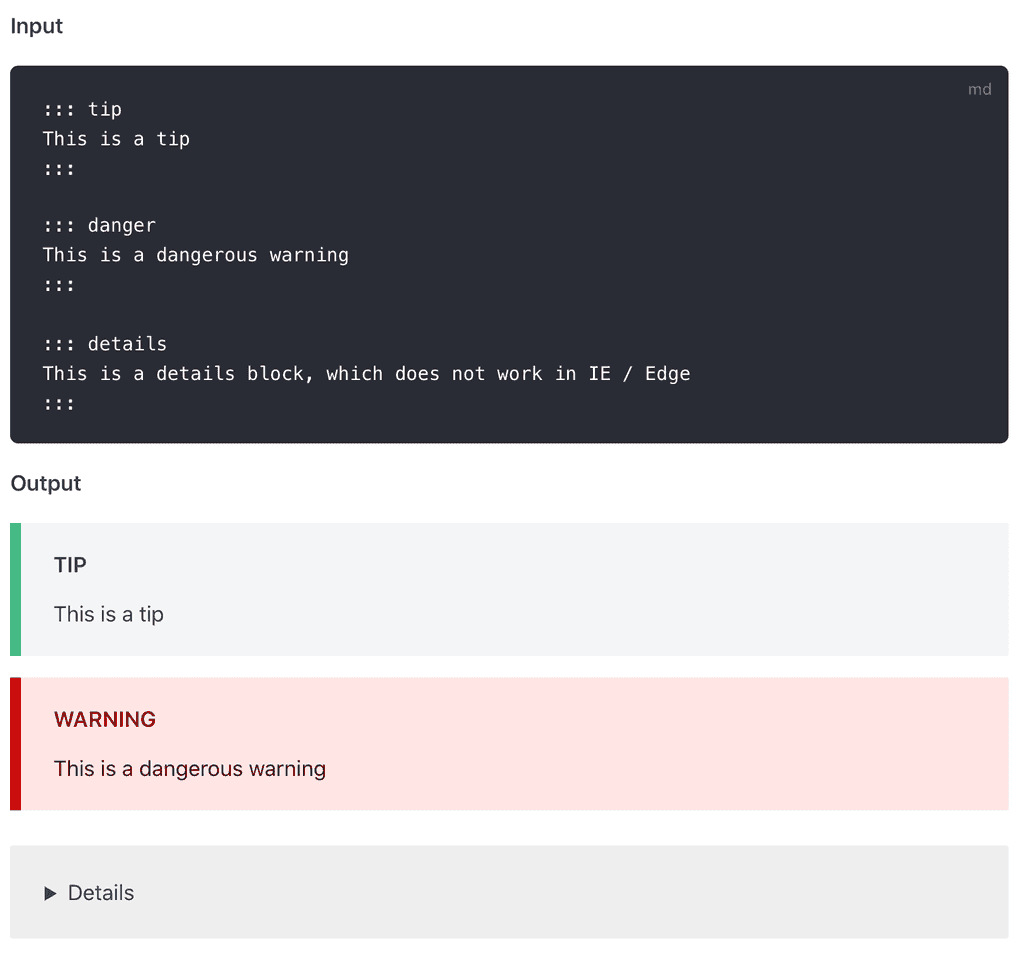
Figure: Good example – VuePress has a custom container that generates nice alert boxes like Bootstrap but without tying the presentation to the CSS framework in the content Unfortunately, Markdown does not support YouTube videos embedding out of the box. However, there is a workaround to embed it.
[](http://www.youtube.com/watch?v=dQw4w9WgXcQ)Figure: Good example - Workaround to embed YouTube video using YouTube's generated thumbnail
If your site is using "markdown-it" parser, you can also install "markdown-it-video" to allow YouTube videos directly embedded into the page, rather than providing just an image and a link.
@[youtube](http://www.youtube.com/embed/dQw4w9WgXcQ)Figure: Better example - YouTube video embedding using a plugin
Markdown to HTML rendering processes
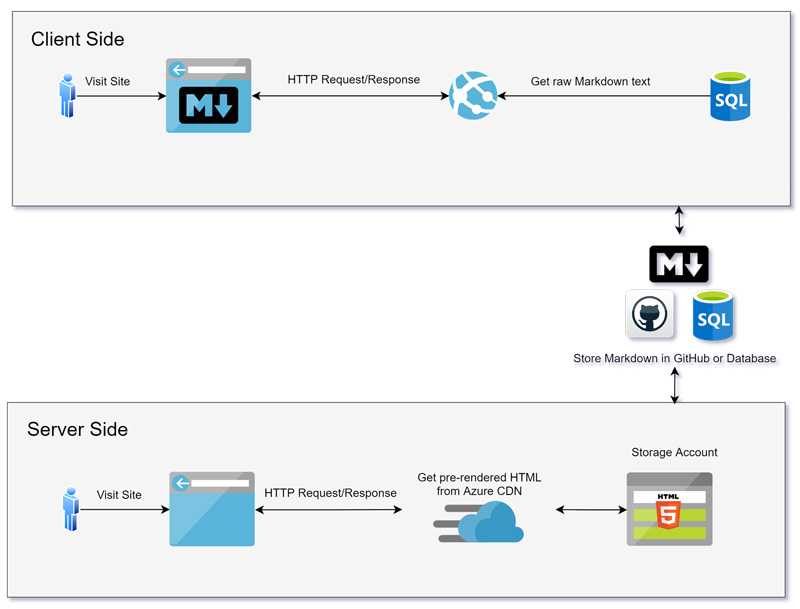
Figure: The Markdown rendered either Client-side or Server-side SSW Rules are technical documentation presented as practical guidelines that help teams build better software and work more effectively. They capture best practices across coding, architecture, communication, design and project management, making them a living knowledge base that supports consistency, clarity and quality in every project.
This is an example rule + Markdown cheatsheet to give you some guidance around how to write rules and show you the things you can use to format an SSW Rule. For more info see our GitHub Wiki page.
Concepts to write rules
There are a few concepts that are applied to structure most SSW Rules:
- Show the pain - Usually in the intro, explain the problem and context around why that rule exists
- Give good and bad examples - Include practical examples for people to better understand the concepts. Using images is usually the best way to go
- Explain the why, not the how - A rule isn't a place to document how to use a 3rd party product. You should focus on the reasons why we do something, and then link to external documentation on how to do something
See a few examples of SSW Rules that follow the structure of good and bad examples, then link off to external documentation for more information:
- GitHub Issues - Do you use Issue Templates?
- Bicep - Do you use User-defined Data Types?
- Do you know how to backup data on SQL Azure?
1. Headings, paragraphs, and blockquotes
## This is a heading 2

### This is a heading 3

#### This is a heading 4

##### This is a heading 5

###### This is a heading 6 and below is a blockquote

> Lorem ipsum dolor sit amet, consectetur adipiscing elit. Integer posuere erat a ante.
> \- Someone famous
Figure: Markdown to generate headings and blockquotes
Do not use Heading 1 (
<h1>) in the content, even with the good intention of improving SEO. The page title already uses<h1>, and adding more can harm accessibility and semantic structure. As per MDN guidelines - avoid multiple<h1>elements on the same page.This is a heading 2
Lorem ipsum dolor sit amet. Ut enim ad minim veniam, quis nostrud exercitation. qui officia deserunt mollit anim id est laboru.
This is a heading 2 with some emphasized text by making it bold
Tip: See text decoration section for more details on making the text bold.
This is a heading 3
Lorem ipsum dolor sit amet. Ut enim ad minim veniam, quis nostrud exercitation. qui officia deserunt mollit anim id est laboru.
This is a heading 4
Lorem ipsum dolor sit amet. Ut enim ad minim veniam, quis nostrud exercitation. qui officia deserunt mollit anim id est laboru.
This is a heading 5
Lorem ipsum dolor sit amet. Ut enim ad minim veniam, quis nostrud exercitation. qui officia deserunt mollit anim id est laboru.
This is a heading 6
Lorem ipsum dolor sit amet. Ut enim ad minim veniam, quis nostrud exercitation. qui officia deserunt mollit anim id est laboru.
...and this is a blockquote:
Lorem ipsum dolor sit amet, consectetur adipiscing elit. Integer posuere erat a ante.
- Someone famous
2. Text decorations
_This text will be italic._ **And this text will be bold.** ~~strikethrough.~~ _You **can** combine them_. <mark>These words</mark> are surrounded by a <mark> (HTML needed).Figure: Markdown to generate different text styles
This text will be italic.
And this text will be bold.
strikethrough.You can combine them.
These words are surrounded by a <mark> (HTML needed).
3. Lists
#### Unordered lists

- This is the first item of an unordered list
- This is the second item of an unordered list
  1.  This is the first item of an ordered list inside an unordered list
  2.  This is the second item of an ordered list inside an unordered list
- This is the third item of an unordered list
  - This is the first item of an unordered list inside another
  - This is the second item of an unordered list inside another
    1. This is the first item of an ordered list inside a nested unordered list
    2. This is the second item of an ordered list inside a nested unordered list

#### Ordered lists

1. This is the first item of an ordered list
2. This is the second item of an ordered list
3. This is the third item of an ordered list
   - This is the first item of an unordered list inside an ordered list
   - This is the second item of an unordered list inside an ordered list
     1. This is the first item of an ordered list inside another
     2. This is the second item of an ordered list inside another
Figure: Markdown to generate lists
Unordered lists
- This is the first item of an unordered list
-
This is the second item of an unordered list
- This is the first item of an ordered list inside an unordered list
- This is the second item of an ordered list inside an unordered list
-
This is the third item of an unordered list
- This is the first item of an unordered list inside another
- This is the second item of an unordered list inside another
- This is the first item of an ordered list inside a nested unordered list
- This is the second item of an ordered list inside a nested unordered list
Ordered lists
- This is the first item of an ordered list
- This is the second item of an ordered list
-
This is the third item of an ordered list
- This is the first item of an unordered list inside an ordered list
- This is the second item of an unordered list inside an ordered list
- This is the first item of an ordered list inside another
- This is the second item of an ordered list inside another
4. Links
[link text](https://www.url.com "link title")Figure: Markdown to generate links
This is an internal link.
This is an internal link with title (hover me).
This is an external link.
Cool link features:
- We use icons on files' links to not to surprise users
- Our main headings auto-generated anchor links so users can easily access a section of a long page like this one. E.g. To go straight to this section of the page, you can access https://ssw.com.au/rules/rule/#4-links
5. Boxes
::: greybox
This is a box using the class "greybox".
:::
Figure: Markdown to generate boxes
This is a box using the class "greybox".
This is a box using the class "highlight".
This is a <div> using the class "info". Works the same as using a <p> . Lorem ipsum dolor sit amet, consectetur adipiscing elit, sed do eiusmod tempor incididunt ut labore et dolore magna aliqua. Ut enim ad minim veniam, quis nostrud exercitation.
This is a <div> using the class "china". Works the same as using a <p> . Lorem ipsum dolor sit amet, consectetur adipiscing elit, sed do eiusmod tempor incididunt ut labore et dolore magna aliqua.
This is a <div> using the class "codeauditor". Works the same as using a <p> . Lorem ipsum dolor sit amet, consectetur adipiscing elit, sed do eiusmod tempor incididunt ut labore et dolore magna aliqua.
This is a <div> using the class "todo". Works the same as using a <p> . Lorem ipsum dolor sit amet, consectetur adipiscing elit, sed do eiusmod tempor incididunt ut labore et dolore magna aliqua. Ut enim ad minim veniam, quis nostrud exercitation ullamco.
Hiding content
Use the class "hidden" to hide content.
::: hidden
bfb265e3-644e-4cbe-b17c-4d378b014809-7947936
:::
Figure: Nothing will show up from this Markdown
6. Images
::: class  :::Classes for images
Figure: Image using class "img-small" Figure: Image using class "img-medium" Figure: Image using class "img-large" Figure: Image using class "no-border" Extra examples
Figure: How a smaller image (400px) works with long caption. Full screen on mobile, real width on larger screens... Figure: ...and with a short caption TODO: Make these images hosted internally as per Do you make sure your images are hosted internally?
7. Captions
::: bad
Figure: Caption for bad examples
:::

::: ok
Figure: Caption for OK examples
:::

::: good
Figure: Caption for good examples
:::
Captions on images
Figure: Caption for bad images Figure: Caption for regular images Figure: Caption for OK images Figure: Caption for good images Captions on boxes
This is an example of a bad grey box.
Figure: Caption for bad examples
This is an example of a normal grey box.
Figure: Caption for normal examples
This is an example of a OK grey box.
Figure: Caption for ok examples
This is an example of a good grey box.
Figure: Caption for good examples
8. Videos
Code for videos
`youtube: https://www.youtube.com/embed/0ugMkda9IBw`
**Video: Top 5 Reasons Why ASP.NET MVC is Great (3 min)**
Figure: Markdown to add videos and video captions
Example
Check out this video - it's responsive!
Video: Top 5 Reasons Why ASP.NET MVC is Great (3 min)
9. Twitter Cards Embed
Embedding a Tweet is similar to a video. Copy the link of the tweet then add it to the rule with backticks on each side like this:
`oembed: https://twitter.com/MrHinsh/status/24123713864`oembed: https://twitter.com/MrHinsh/status/24123713864
10. Code
To include code block in Markdown, start with 3 backticks
`on a new line, write or paste your code, and then end with 3 backticks on a new line.For syntax highlighting in code blocks, add the language name right after the opening backticks. Learn more on Markdown – Do you set the language on code blocks?
To add inline code in Markdown, wrap the code snippet with single backticks. See
this textas inline code for example.This is a piece of code in a code blockFigure: Bad example - Because this code doesn't include the language used
See this json file for all supported languages and their aliases we can use in SSW Rules. See some examples:
let iceCream = "chocolate";
if (iceCream === "chocolate") {
  alert("Yay, I love chocolate ice cream!");
} else {
  alert("Awwww, but chocolate is my favorite...");
}
Figure: Javascript code block
IF EXISTS (SELECT 1 FROM
               INFORMATION_SCHEMA.TABLES
           WHERE
               TABLE_TYPE='BASE TABLE' AND
               TABLE_NAME='Employees'
           )
    ALTER TABLE [dbo].[Employees]( …… ) ON [PRIMARY]
ELSE
    CREATE TABLE [dbo].[Employees]( …… ) ON [PRIMARY]
Figure: SQL code block
public class MyClass
{
    public string  myField = string.Empty;

    public MyClass()
    {
    }

    public void MyMethod(int parameter1, string parameter2)
    {
        Console.WriteLine("First Parameter {0}, second parameter {1}",
                                                    parameter1, parameter2);
    }

    public int MyAutoImplementedProperty { get; set; }

    private int myPropertyVar;

    public int MyProperty
    {
        get { return myPropertyVar; }
        set { myPropertyVar = value; }
    }
}
Figure: C Sharp code block
{
  "glossary": {
    "title": "example glossary",
    "GlossDiv": {
      "title": "S",
      "GlossList": {
        "GlossEntry": {
          "ID": "SGML",
          "SortAs": "SGML",
          "GlossTerm": "Standard Generalized Markup Language",
          "Acronym": "SGML",
          "Abbrev": "ISO 8879:1986",
          "GlossDef": {
            "para": "A meta-markup language, used to create markup languages such as DocBook.",
            "GlossSeeAlso": ["GML", "XML"]
          },
          "GlossSee": "markup"
        }
      }
    }
  }
}
Figure: JSON code block
11. Email Templates
Code for email template
::: email-template
| | |
| -------- | --- |
| To: | XXX |
| Cc: | YYY |
| Bcc: | ZZZ |
| Subject: | {{ EMAIL SUBJECT }} |
::: email-content

### Hi XXX,

{{ EMAIL CONTENT }}

:::
:::
::: good
Figure: Good example - Nice email template
:::
Figure: Markdown for email templates
Figure: Good example - Nice email template
12. Tables
Code for tables
| Tables        |      Are      |   Cool |
| ------------- | :-----------: | -----: |
| col 3 is      | right-aligned | \$1600 |
| col 2 is      |   centered    |   \$12 |
| zebra stripes |   are neat    |    \$1 |
Figure: Markdown to generate tables
Examples
Tables Are Cool col 3 is right-aligned $1600 col 2 is centered $12 zebra stripes are neat $1 Markdown Less Pretty Still rendersnicely 1 2 3
13. Thematic breaks (horizontal rules)
A thematic break is used to separate sections of content or indicate a shift in topic. In Markdown, it renders as a horizontal line.
Code for hr
---Example output
Here’s what the --- version looks like in rendered Markdown
Conclusion
Markdown and SSW Rule conventions make your content clear, consistent, and easy to read. Use headings, lists, boxes, images, code, and thematic breaks to structure your rules effectively. This guide is your reference to create professional, maintainable documentation every time.
When making a link bold in Markdown, the position of the bold formatting matters. Even though both approaches render visually similar, only one preserves proper semantics, accessibility, and consistent styling.
❌ Avoid wrapping the link with bold formatting
Markdown example:
**[Read more about our pricing](/pricing)**This results in less ideal HTML:
<strong><a href="/pricing">Read more about our pricing</a></strong>Figure: Bad example - While it may look the same, the bold is no longer part of the link element, which can cause inconsistencies and reduces semantic clarity
✅ Place the bold formatting inside the link syntax
This ensures:
- The entire link is both bold and clickable
- Correct semantic HTML structure
- Better accessibility for screen readers
- Predictable styling across Markdown renderers
Markdown example:
[**Read more about our pricing**](/pricing)HTML output:
<a href="/pricing"><strong>Read more about our pricing</strong></a>Figure: Good example - Cleaner HTML, better accessibility, and more consistent styling across your design system
If text is both bold and a link, the bold should live inside the link syntax, not the other way around.