Pull Requests are the backbone of an effective development team. That's why it's crucial to ensure that everyone on the team understands the expectations around Pull Requests.
Everybody strives to be perfect, but mistakes are normal, and it is easy for a developer to skim over errors when they've read their own code code hundreds of times!
Pull requests are the best way to ensure that two sets of eyes see every change - so the responsibility is never solely on the person writing the code.
As a software developer, you are going to create Pull Requests (PRs) that you want to be easy for others to review and approve. The quality of a Pull Request can vary - from cryptic to well-written.
Including a little bit of context helps your reviewer understand changes quickly so they can review your PR faster and give better suggestions.
There are 2 essential things you should have when writing a Pull Request:
The use of Draft Pull Requests is a handy practice to indicate work in progress promoting early collaboration and continuous feedback. This approach enhances code quality, reduces duplication, and helps to maintain a transparent and efficient development pipeline. Creating Draft Pull Requests will also trigger GitHub Workflows so developers get early feedback on the quality of their changes.
Draft Pull Requests are less effective if they are not clearly marked as Draft, as is the case on GitHub. To make them clearer, use a naming convention like
🚧 WIP: {{PR Title}}to clearly show that it is a Draft Pull Request.GitHub
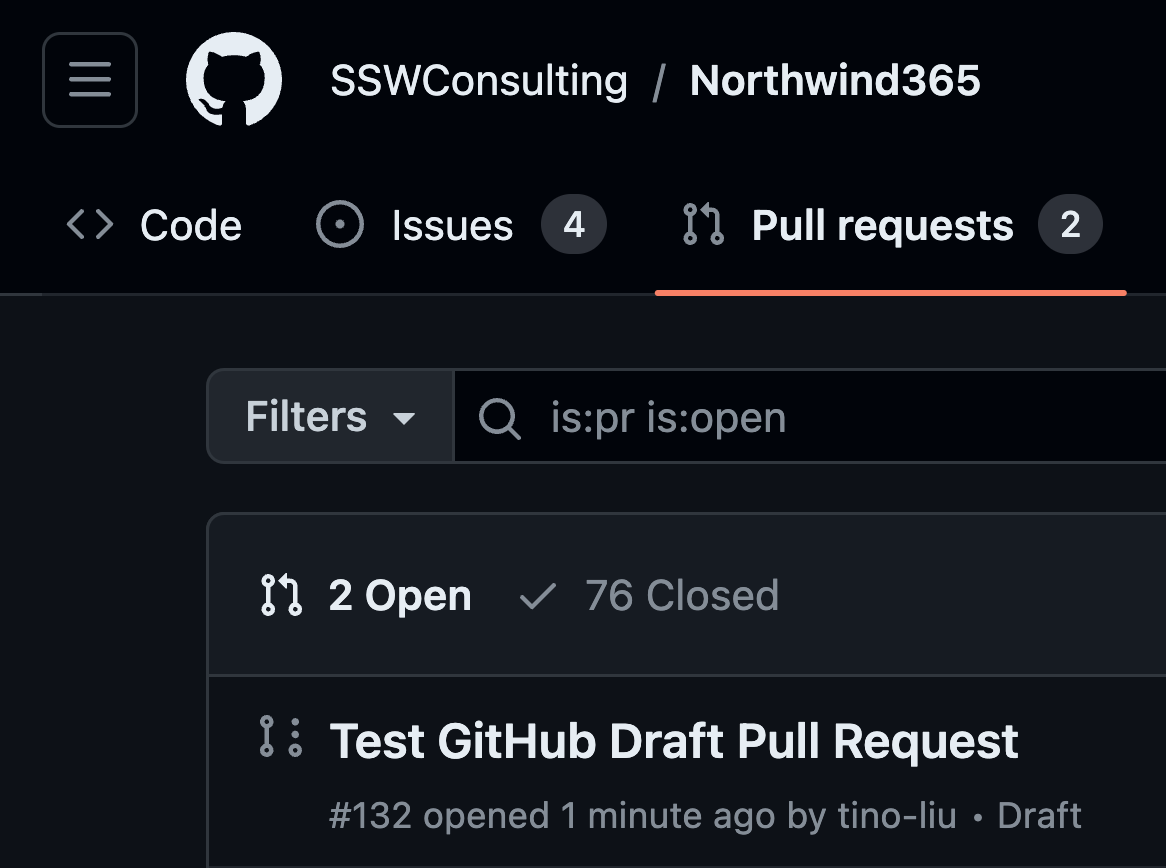
❌ Figure: Bad example - The default experience lacks clear indication that this is Draft Pull Request
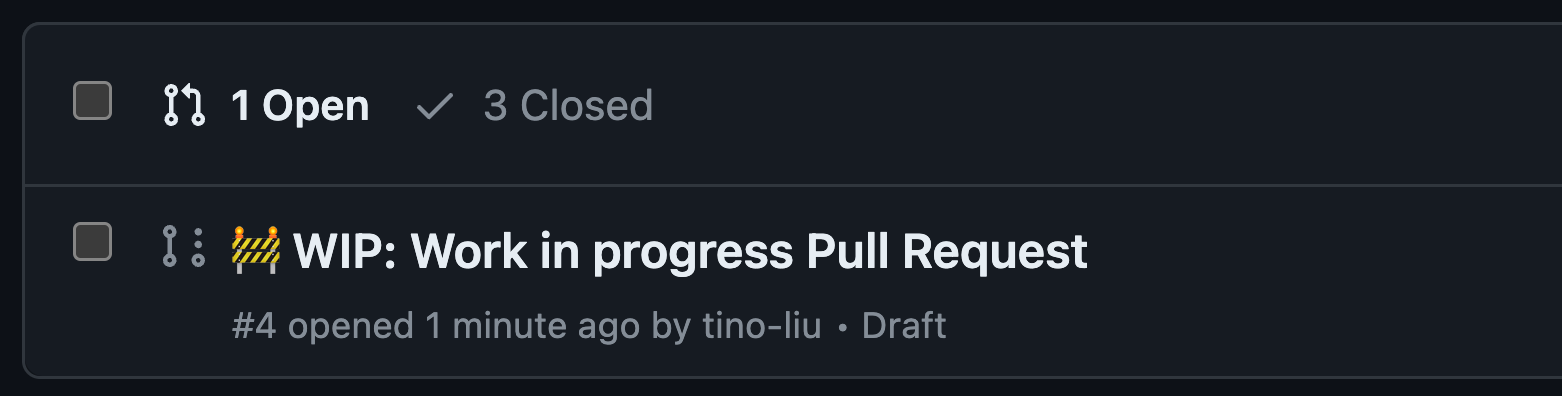
✅ Figure: Good example - Add prefix with 🚧 emoji to clearly indicate it is a Draft Pull Request
If you want to go one step further, you can add the WIP App to your repo. The WIP App prevents the merging of Pull Requests with "WIP" in their title. When you are ready to go, you just remove the WIP prefix.

✅ Figure: Good example - WIP app catching Draft Pull Request
Azure DevOps
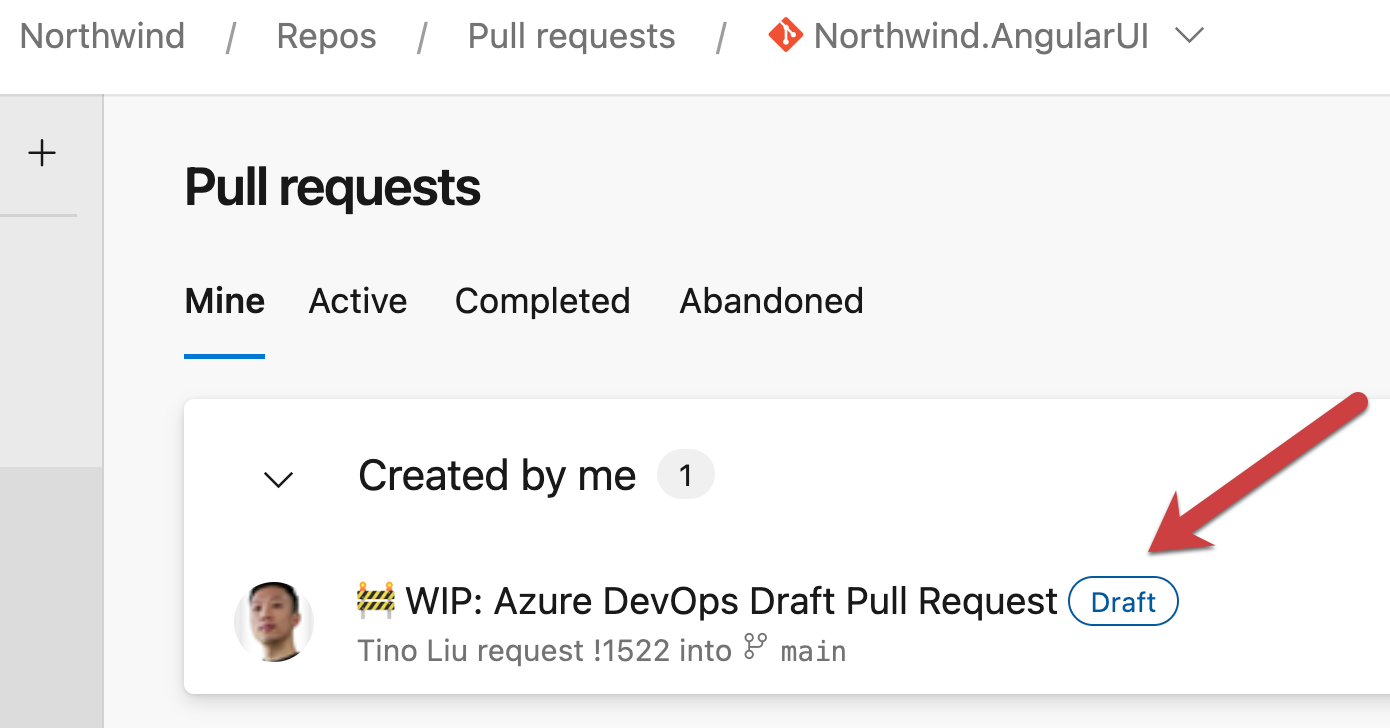
✅ Figure: Good example - Clear naming and indication of a draft pull request
The PR author is responsible to follow up and get PRs merged as soon as possible. An "over-the-shoulder" review is one of the best ways to avoid merge debt.
When a pull request (PR) is ready to be reviewed, get someone with you either in-person or on call, and go through the PR together. This not only allows you to demo the content of the PR but also talk with the person taking feedback when needed.
When a pull request is left open for a long time, it becomes stale and accumulates merge debt. The longer it remains open, the more changes occur on the main branch, increasing the work needed to update and merge the PR. This can lead to conflicts, bugs, and unhappy developers.
Pull Request templates are a great way to communicate expectations to developers. You should create different PR templates for different types of PRs. For example, you can have a PR template for bug fixes, a PR template for new features, and a PR template for refactoring. You are also able to create specific PR templates for specific code paths.
For the original article check out Don't "Push" Your Pull Requests by Ilya Grigorik.
Open source software projects love it when the community get involved and pitch in.
It's great when someone fixes a bug.
A short PR to fix a small problem is easy to review and accept.
Before merging any Pull Request (PR) that might affect your application's behavior or performance, you should run comparison tests between the production environment and the PR deployment slot to identify potential issues.
Pull requests are a fundamental feature of collaborative software development, allowing contributors to propose changes to a project and receive feedback from other developers. When reviewing a pull request, it can be tempting to make additional changes beyond those requested by the PR creator.
Certain projects (E.g. SSW.Rules) allow these additional edits, without the need for extra reviews by someone else. Knowing that, it's crucial to make sure the changes are correct, necessary and beneficial to the project before adding them.
When creating a Pull Request with your changes, it is important to have a good description that will help the reviewer to understand what was done.
Leaving the description blank is common and not helpful. There are also cases where people overexplain. You should try to include just the right amount of information.
per page
1 - 10 of 21 itemsper page
1 - 10 of 21 items