Do you know what DNS is and how it works?
Loading last updated info...
Have you been in a scenario when you look at a website in your phone and it works. Meanwhile, one of your colleagues is looking at it in their PC and they get a response saying this site doesn't exist. That's probably a DNS (Domain Name System) issue.
DNS is akin to the internet's phonebook. It's easy to remember a website's name, like www.ssw.com.au, but computers and networks need numerical IP addresses to access websites. DNS translates human-readable domain names to machine readable IP addresses.
DNS explained
Video: Everything You Need to Know About DNS (5 min)
Understanding DNS is crucial for troubleshooting connectivity issues, optimizing network performance, and ensuring secure internet navigation
When you type www.ssw.com.au into your browser, the process to translate this human-readable domain name into a machine-readable IP address involves several steps and servers in the Domain Name System (DNS). Here's a detailed breakdown:
- Domain Name Input - You enter
www.ssw.com.auinto your web browser. - Browser Checks Cache - First, your browser checks its own cache to see if it has recently resolved the IP address for
www.ssw.com.au. If it finds the IP address there, it skips the remaining DNS steps and proceeds to connect to the web server. - Operating System Cache Check - If the browser cache doesn't have the IP address, the query moves to the operating system's DNS cache. If the operating system (OS) has the IP address cached, the DNS lookup process stops here, and the browser uses this IP address. If not, the process moves to the next step.
- DNS Resolver Query - The query is sent to a DNS resolver, typically operated by your Internet Service Provider (ISP). The resolver checks its cache; if the IP address is there (and still valid based on its TTL), the process ends, and the IP is returned to your browser. If not, the resolver queries a root nameserver.
- Root Nameserver Query - The DNS resolver contacts one of the root nameservers. The root server doesn't know the IP address for
www.ssw.com.aubut knows where to direct queries for.audomains. It responds with the address of the TLD nameserver for.au. - TLD Nameserver Query - Next, the resolver contacts the
.auTLD nameserver. This server manages information for.audomains but doesn't store individual IP addresses. Instead, it knows which authoritative nameserver handlesssw.com.au. It responds with the address of this nameserver. - Authoritative Nameserver Query - The resolver then queries the authoritative nameserver for
ssw.com.au, which has the actual IP address forwww.ssw.com.au. This server responds with the IP address of the web server hosting thessw.com.ausite. - Resolver Caching - The DNS resolver caches the IP address of
www.ssw.com.auwith the corresponding TTL. This caching helps speed up future requests to the same domain. - Browser Connection to Web Server - With the IP address now known, your browser can establish a connection to the web server hosting
www.ssw.com.au. It sends an HTTP request to the server asking for the web page associated withwww.ssw.com.au. - Web Server Response - The web server processes the request and sends the requested web page back to your browser, which then displays the content to you.
Each of these steps involves complex interactions between your computer, various DNS servers, and the final web server hosting the content you wish to access. This process, although it might seem lengthy, happens within milliseconds, allowing for the quick loading of web pages.
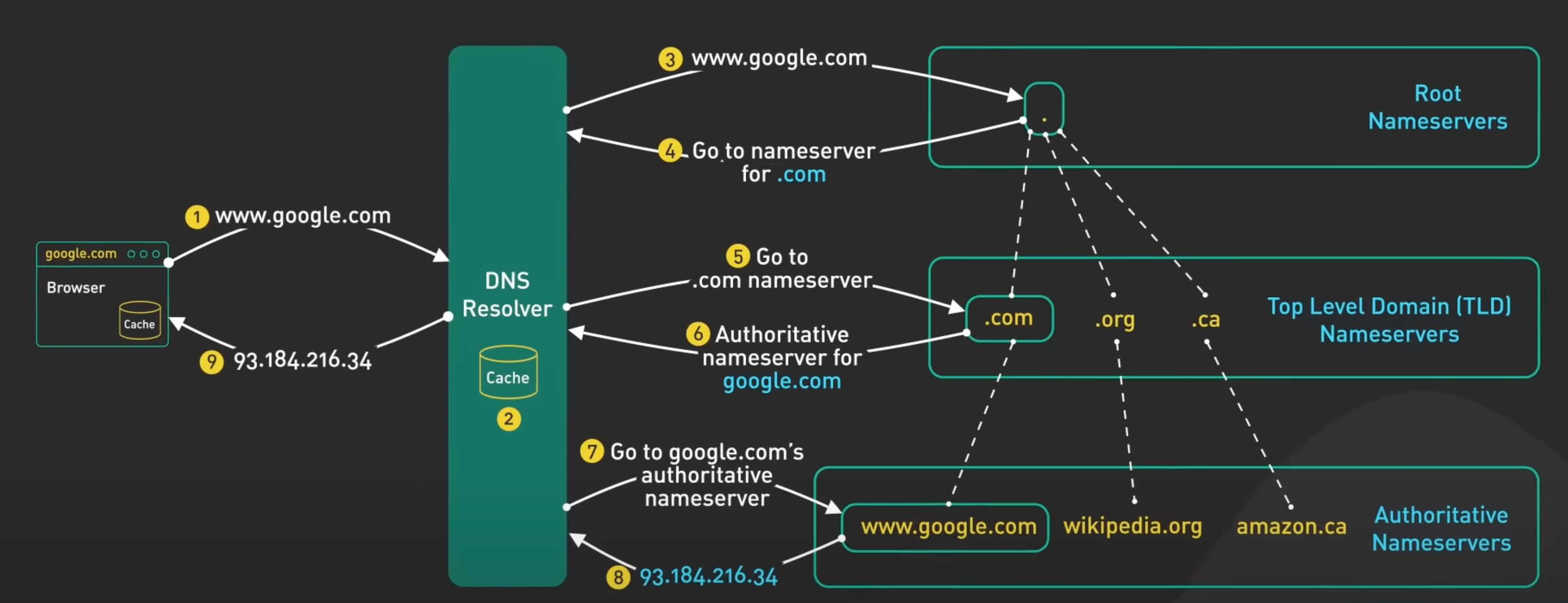
Figure: DNS - finding the correct authoritative nameserver
Image source: ByteByteGo's DNS Video
Hierarchical Structure of Domain Names
Domain names are structured hierarchically, with the right-most component being the top-level domain (TLD). In the domain name www.ssw.com.au:
.auis the country-code top-level domain (ccTLD) for Australiacom.auis considered a second-level domain within the.auccTLD. It's commonly used by commercial entities in Australiassw.com.auis a domain registered by an entity (in this case, SSW) within thecom.auspacewww.ssw.com.auincludes a subdomain (www) of thessw.com.audomain
How DNS Knows com.au is a TLD
In essence, DNS doesn't treat com.au as a single TLD but rather as a combination of a second-level domain (com) under the .au TLD. The distinction comes from the DNS hierarchy and the namespace management:
- Root Nameservers: At the top of the DNS hierarchy are the root nameservers. They have the information necessary to direct queries to the TLD nameservers.
- TLD Nameservers: Each TLD, like
.com,.net,.org, or a country-code TLD like.au, has its own nameserver(s). When a query reaches this level, the TLD nameserver directs the query to the appropriate second-level domain nameserver, if applicable. - Registry and Registrar: The registry for a TLD manages the domain names within that TLD. For example, the registry for
.aumanages all domains ending in.au, includingcom.au,org.au, etc. When someone registers a domain likessw.com.au, they are registering a second-level domain within the.auTLD. The registry ensures that each domain name is unique within its namespace. - Authoritative Nameservers: For a given registered domain, like
ssw.com.au, there are authoritative nameservers that know the IP addresses for subdomains (likewww.ssw.com.au).
Direct Browsing to a Second-Level Domain
You can browse to a second-level domain if it is set up to host content. For example, if com.au were registered as a domain with its own website, you could browse to it directly. However, com.au is reserved for structuring domain names within Australia and is not used as a standalone website. This is managed through DNS policy and registration rules set by the domain registry responsible for the .au domain space.
In summary, DNS distinguishes between different levels of domains through its hierarchical structure, managed by a combination of root, TLD, and authoritative nameservers. The ability to browse to a domain depends on whether it is registered and configured to host content, regardless of whether it's a TLD, a second-level domain, or lower.
Common DNS record types
In the context of DNS (Domain Name System), a "type" refers to the kind of DNS record in a DNS server's database, here are some common ones:
| Type | Function | Common Example |
| Address Record (A) | Maps a domain to an IPv4 address | example.com maps to 93.184.216.34 |
| IPv6 Address Record (AAAA) | Maps a domain to an IPv6 address | example.com maps to 2606:2800:220:1:248:1893:25c8:1946 |
| Canonical Name Record (CNAME) | Maps a domain to another domain name (aliasing) | www.example.com aliases to example.com |
| Mail Exchange Record (MX) | Specifies mail servers for a domain | example.com mail handled by mail.example.com |
| Name Server Record (NS) | Delegates a subdomain to a set of name servers | sub.example.com delegated to ns1.example.com |
| Pointer Record (PTR) | Maps an IP address to a domain (reverse DNS) | 34.216.184.93 reverses to example.com |
| Start of Authority Record (SOA) | Stores administrative information about a zone | example.com SOA record indicates ns1.example.com as primary NS |
| Service Locator Record (SRV) | Specifies services available in a domain | _sip._tcp.example.com points to SIP server at sipserver.example.com port 5060 |
| Text Record (TXT) | Holds text information for external sources to read | example.com uses a TXT record for SPF: "v=spf1 include:_spf.example.com ~all" |