Do you know the best way to demo Microsoft CRM to clients?
Loading last updated info...
When demoing Dynamics to a client we will typically use a dedicated demo environment for a few reasons:
- Demoing company Dynamics not a good idea due to sensitive data leakage
- Can preinstall any first-party or third-party solutions ahead of time
- Potentially hand demo environment over to the client for further evaluation
What are the demo options?
Microsoft Partners
Microsoft Partners have access to the Customer Digital Experience site. This site allows each eligible user to create up to 2 demo environments. Environments are provisioned within minutes and contain the entire Microsoft 365 suite with Dynamics 365 pre-installed. There usually sample users and enough licenses to add custom users to the demo.
Adding a Dynamics Environment is as easy as navigating to: My Environments | Create Tennant | Dynamics 365 Customer Engagement

Once the environment is created it's good for 90 days.
Office 365
The second option is to provide a trial via Office 365. If using this method, it is preferable to provision via the client's Office 365 instance, as you don't want to provision users for the client in your Office 365 tenant. To provision a Dynamics trial in Office 365 use the following:
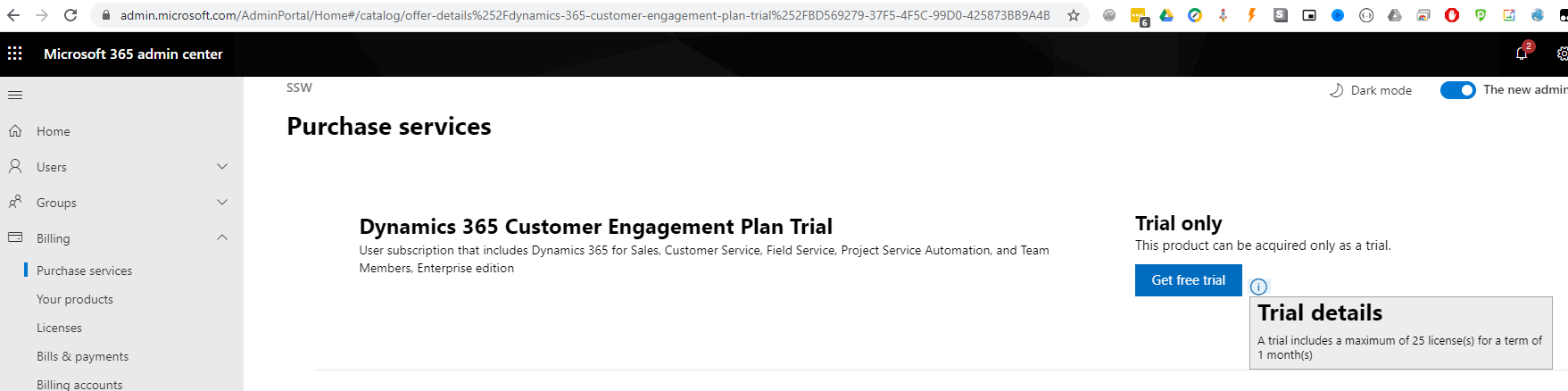
- Browse to Microsoft Admin Portal
- Billing | Purchases Services (it's ok we're not buying anything yet)
- Search for "Trial" and scroll down to Dynamics 365 Customer Engagement Plan Trial
- Details | Get free trial
The Office 365 based Dynamics trial is good for 1 month and includes 25 users.
The advantage of using an Office 365 based Dynamics trial (in the customers' Office Instance), is that is can be converted to a paid product very easily and with all data kept intact.
You should be able to show:
- Accounts
- Contacts
- Sales (Leads, Opportunities, Quotes, and Invoices)
- Marketing (built-in Campaigns and Quick Campaigns, also talk about Marketing for Dynamics solution)
- Service (Cases, Field Service)
- Mail Merge