Post-Production - Do you know how to structure video files?
Loading last updated info...
Figuring out how your workflow operates is an essential part of the editing process. As such you should make sure to have an effective and consistent file/folder structure.
Video Project Organization
Things that go under each main folder:
- YYYY-MM-DD-project-name
- Assets
- Contains all external files, and a copy of any files used from the server's 05-assets directory
- Edit
- Contains the active project files, e.g. Premire Pro .pproj files
- Exports
- Contains all edit exports & renders
- Footage
- Contains all captured media, e.g. video, screen captures, & audio that was recorded for the project
- Use YYYY-MM-DD-description
- Contains multi-day or multi-camera shoots
- Graphics
- Contains After Effect project files, e.g. .aep files
Data Server Organization
It is also very important to keep your shared resources and servers organized.
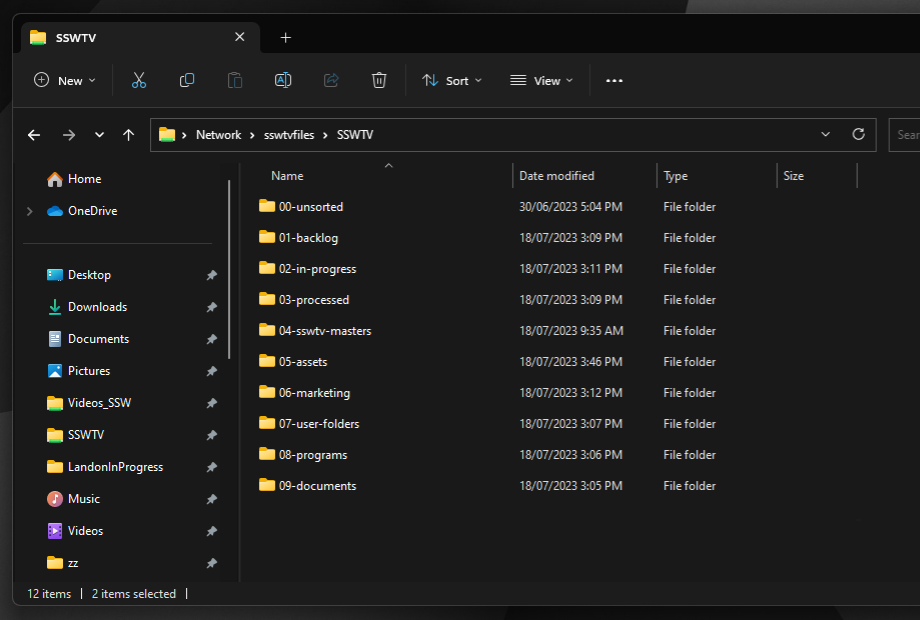
Figure: An efficient way for a team to structure their server and common files/folders
Things that go under each folder:
- 00-unsorted
- Contains legacy folders that need to be sorted and put in an appropriate location.
- 01-backlog
- Contains all backlog video items to be processed.
- The internal folder structure is YYYY-MM-DD-project-name
- 02-in-progress
- Contains all backlog video items currently in progress.
- Each user should have their own personal folder named [Firstname]InProgress
- Folders are moved to a user's InProgress folder from 01-backlog
- 03-processed
- Contains all video items that have been finished (archived).
- The internal folder structure is YYYY-MM-DD-project-name
- 04-masters
- Contains final exports from videos that can be showcased – a copy of the video file only, to be sorted in folders by year.
- The internal folder structure is YYYY | YYYY-MM-DD-project-name
- 05-assets
- Contains all the assets for video editing and graphics, including:
- graphics
- music
- sound-effects
- fonts
- 06-marketing
- Contains folders used by the marketing team, including the Photos folder
- 07-user-folders
- Contains user’s personal folders
- 08-programs
- Contains installation files for video production software, including:
- drivers
- plugins
- 09-documents
- Contains documents - to be synchronized to
VIDEO-Videos