Post-Production - Do you use 'HD or '4K' quality?
Loading last updated info...
There is a myriad of video formats and codecs that exist for all project types. It’s important for your project to use the correct format depending on what it is you are doing and what you want to achieve with your video.
Most, if not all, modern video cameras sold today record at 4k resolution. Also, modern compression types allow you to 'squeeze' the large amounts of data that would normally take up gigabytes of storage right down to something that can be streamed over the web, without too much loss of fidelity.
Because of the ease of recording and compressing down 4K video, it seems like a no brainer that videos should be produced in 4K rather than HD 1080p.
Where possible, do your camera work in 4K, and then when you edit your project do it in 1080p so you can use the extra resolution to 'fake zoom-in'. If the client specifically requests the highest possible video quality, stick to editing the project in 4K.
After your videos recorded and edited using your editor of choice, you need to choose an appropriate export setting. Assuming you're making the video for web streaming (e.g. YouTube), here are the best export settings:
Export Settings for Adobe Premiere Pro:
- Select H.264 as your format
- In the Video tab, the Bitrate settings will be pre-selected depending on the resolution selected.
- For 1080p we recommend 5-10Mbps (smaller number smaller file size, less quality)
- For 4k we recommend 20-30Mbps
- In the Audio tab| Bitrate Settings | Bitrate [kbps] | 320kbps

Figure: Video Export settings in Premiere Pro

Figure: Audio Export settings in Premiere Pro
Export Settings for Camtasia
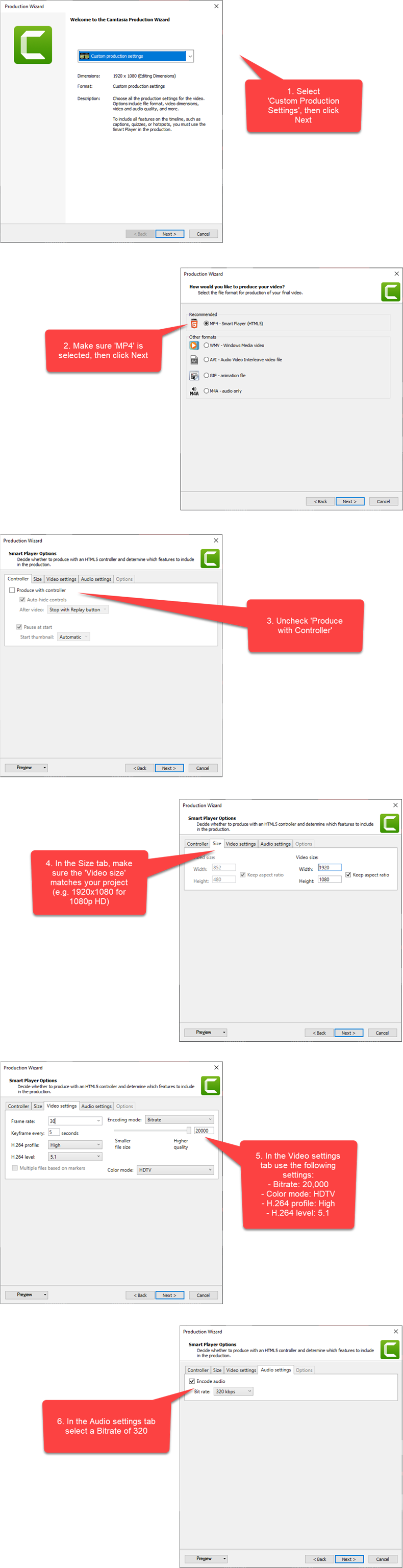
Figure: Camtasia export settings