Since 1990, SSW has supported the developer community by publishing all our best practices and rules for everyone to see.
If you still need help, visit SharePoint Server Consulting and book in a consultant.
Migrating from SharePoint 2007 to SharePoint 2010 can be a daunting task, but if you follow this guide you will be able to migrate with minimum problems.
These rules focus on migrating from a single server configuration of SharePoint 2007 to a single server configuration of SharePoint 2010. We will assume your SharePoint 2007 server has the DNS of sharepoint.northwind.com
Do you agree with them all? Are we missing some? Email us your tips, thoughts or arguments. Let us know what you think.
In SharePoint 2007, it is a good idea to add the path to stsadm.exe into the environment variables on a SharePoint server so you can open a command prompt and run the tool from anywhere.
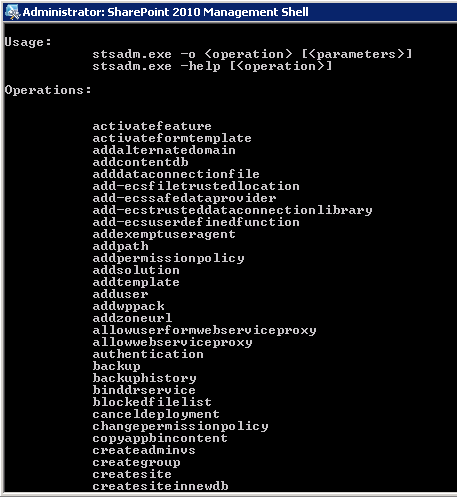 Figure: you should be able to quickly type ‘stsadm’. Believe me you will be typing it enough! In SharePoint 2010, you can skip quite a few steps by using the PowerShell Console.
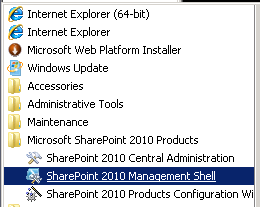 Figure: Using SharePoint 2010 Management Shell
You all know about a web master, the central point of contact if the website goes down. You should know about Schema Masters for Database Design. SharePoint should be no different.
The SharePoint master should be your companies SharePoint expert. All major changes to the SharePoint servers should be run by the SharePoint master including:
It is a good idea to run a pre-migration check on the SharePoint 2007 before starting the migration process.
- Check you have followed Do you add stsadm to the environmental variables?
- Open up cmd with Administrator privileges
- Run the following command: **stsadm –o preupgradecheck
**
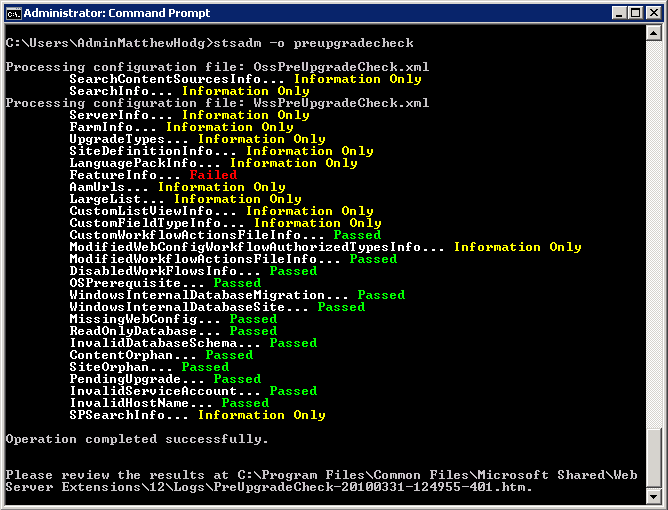 **
Figure 3 - Check the pre-migration report. The only thing that is allowed to fail is “FeatureInfo”. This is because a custom feature won’t migrate and developers need to create a build targeted for SharePoint 2010 ** 4. Save the HTML file that was generated and email it to your companies SharePoint Master. (Don’t print it as its very large) 5. Have the SharePoint Master sign off on the pre-migration check and inform you if there are any site collections or content sources that are no longer needed and can be ignored for migration
**
Figure 3 - Check the pre-migration report. The only thing that is allowed to fail is “FeatureInfo”. This is because a custom feature won’t migrate and developers need to create a build targeted for SharePoint 2010 ** 4. Save the HTML file that was generated and email it to your companies SharePoint Master. (Don’t print it as its very large) 5. Have the SharePoint Master sign off on the pre-migration check and inform you if there are any site collections or content sources that are no longer needed and can be ignored for migrationWhen you move to SharePoint 2010, nothing is to unexpectedly disappear. So prior to the migration, you need to find out which solutions you currently have installed and decide if you will be installing them on the new server.
When you move to SharePoint 2010, you will need to know the settings you had on your 2007 server. Therefore document all the settings from the SharePoint 2007 server, that you will need to re-create on the SharePoint 2010 server.
You should have at this point, either:
We are now ready to make a new web application and site collection which we will need to match closely to the original SharePoint 2007 server. In the SharePoint 2010 server:
- Open SharePoint Central Administration | Manage web applications
- Click on New
- Enter in the details for the web application using the document from the rule Do you document the details of your SharePoint 2007 web application?
- Go back to SharePoint Central Administration | Create site collections
- Fill out the form to create a new site collection – the only option that is important here is to create a site collection that matches the site collection you will be migration. Eg: If the site collection you are migrating is a Team Site, make a site collection that is a Team Site.
Note: The rest do not matter as they will be replaced when you restore the database from SharePoint 2007.
Solutions must be deployed to the new site collection before the content database is resorted to the SharePoint 2010/2013/2016 server:
- Open SharePoint Central Administration | System Settings | Manage Farm Solutions
- Click on Deploy Solution
- Refer to the table you completed in the rule Do you confirm your list of installed Solutions and deploy the solutions to the same site collections they were deployed to on the SharePoint 2007/2010/2013 server.
Even though you have advised staff members a migration is taking place – you can guarantee someone will try to check-in or edit documents. The best way to prevent this is to put your content database into read-only mode, locking the content database.
This is the meat of the migration process. First we need to detach the current content database from the Web Application:
- On the SharePoint 2010 server, open SharePoint Central Administration | Application Management | Manage Content Databases
- Set the Database Status to offline | tick Remove content database
- Open SQL Server Management Studio and delete the database you just removed from the web application
Now we need to attach the database backup we took of our SharePoint 2007 server:
per page
1 - 10 of 12 itemsper page
1 - 10 of 12 items