Enhance your YouTube presence with these essential rules, covering video optimization, audience engagement, and effective use of features to maximize your channel's impact.
In the course of your employment, you may produce a number of videos for a project, a client, and/or for your profile.
Your videos must be optimized for YouTube including in regards to the watch time (total time spent watching a YouTube video since it went live) as their algorithm pushes to increase watch time. YouTube will rank higher in a video with a higher watch time (this is not the only setting).
Having great content is important, but it’s not all. You must also consider writing a good title, description, and add relevant tags (not too many).
To keep your video content relevant and aligned with your business goals, it's crucial to revisit your marketing strategy regularly. One effective approach is to brainstorm new video topic ideas every three months based on your existing strategy. This helps ensure that your content stays fresh, targeted, and continues to engage your audience.
Choosing the right keywords will help your audience find your video. However, some keywords are very competitive (many people use them) so you need to “niche” your content as well.
Livestreams are a valuable tool for reaching a global audience, yet they come with their own set of challenges.
They enable us to connect with a worldwide audience in real-time, providing an opportunity to build a larger community over time. In the beginning your livestreams may have low attendance, imagine how incredible it could be to have over a thousand attendees. This can only happen if you persistently build your audience month by month.
✅ The benefits of livestreaming
- Chanel visibility - The YouTube app notifies subscribers when you're live, reinforcing the presence of that your channel is alive even if they don’t tune in immediately
- Reach - You can get an audience that is not local to your office, increasing your brand awareness
- Authenticity - Livestreams are unedited, making the content feel more genuine and relatable. Audiences appreciate the spontaneity and transparency
- Content repurposing - Livestreams can be recorded and reused as video content, extending their lifespan and reach
❌ The downsides of livestreaming
- Decline in YouTube growth - YouTube as a platform is not growing as rapidly as it used to. Instead, viewers are shifting towards other platforms or consuming shorter content like YouTube Shorts
- Reduced in-person attendance - LiveStreaming can sometimes reduce the size of the potential in-person audience. Conversely, the convenience of livestreaming might lead to procrastination, with people planning to watch online but ultimately skipping it
Tips
- Focus on good audio - To make livestreams successful, it's crucial to prioritise good audio quality in YouTube recordings. Clear, professional sound is critical to keep the audience engaged and to make the content enjoyable for both live and later viewing. Poor audio can drive viewers away faster than any other technical issue.
- Don't do watch parties - They tend to dilute the experience by turning what should be a focused viewing session into a more casual social event. This approach often detracts from the content itself and fails to engage the audience as effectively as a well-executed livestream or standalone recording.
When it comes to live streaming to YouTube and editing the livestream for re-publication post-event, there are a few common pain points that can arise:
Firstly, live streaming can be challenging and stressful for the host or presenter, as there is no room for error and everything must go smoothly in real-time. Technical issues, such as poor internet connectivity or hardware malfunctions, can quickly derail a live stream and lead to frustrated viewers.
Secondly, editing a livestream after the fact can be time-consuming and tedious. The raw footage may include mistakes, tangents, or other content that needs to be removed in order to create a polished final product. This can be a daunting task, especially for those who are new to video editing.
Thirdly, as of 27 Oct 2022, Shorts and live streams no longer appear in the videos tab. It’s now split into 3 categories:
- Shorts
- Live
- Videos

Figure: Videos, Shorts, and Live tabs on your YouTube channel
Read more here - https://www.dexerto.com/entertainment/youtube-separate-tabs-live-streams-videos-shorts-1970225/
With this in mind, there are several options you can do to manage your live-stream video content, each with its own pros and cons:
Option 1 - Complete Consistency (OK)
- After the livestream, take it down and upload it so it shows in the videos tab
- Live is archived or zz'd ✅Consistent ✅Shows UserGroup on videos tab ❌Lose views and engagement ❌Expensive

Figure: zz'd LIVE version

Figure: Edited version uploaded showing in Videos Tab
Option 2 - If the video is live and good quality, edit directly in YouTube Editor (Good)
- Add it to a playlist and make that playlist prominent on the YouTube home page
✅Engagement - Keeps views and comments ✅Cheap ✅Faster in outputting content ❌Less consistent ❌Stuck in the Live tab
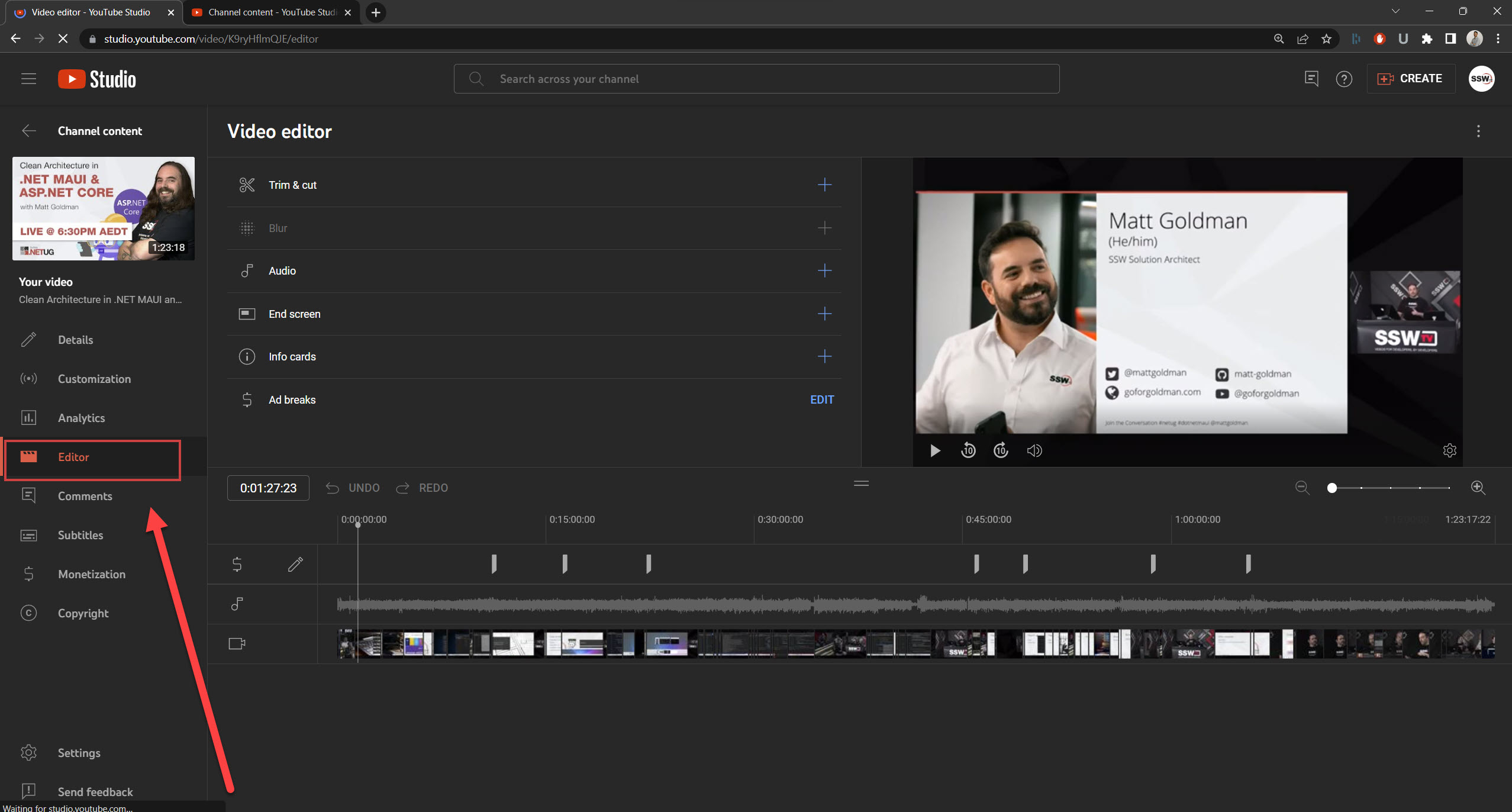
Figure: YouTube Editor

Figure: Homepage | Playlist
Option 3 - Separate the videos (Recommended)
- Keep the unedited Live version online
- Upload an edited version separately (cutting out all the fluff, fixing audio glitches, etc.)
✅Consistent and keep views ✅Shows your edited version on the videos tab ❌Could be viewed as repetitive content (debatable) ❌Expensive - more time spent in post-production
Tip #1
Clearly differentiate titles and thumbnail
Tip # 2
Add an annotation in your unedited livestream to link to the nice edited video

Figure: LIVE Version

Figure: Edited version showing in Video Tab
Overall, there are a number of challenges associated with live streaming to YouTube and editing the livestream for re-publication. However, with the right approach and tools, these challenges can be overcome, and a high-quality, engaging video can be created.
Engaging and interacting with your audience is great a way to get more "activities" around your videos and channel as well as building a faithful audience.
They are a few important terms you need to know and remember when using YouTube to make sure your content will "fit" the site better.
Thumbnails are a great way of telling your (potential) viewers what your video is about and why they should watch it. It is therefore important that these stand out from the others.
per page
1 - 10 of 22 itemsper page
1 - 10 of 22 items